Eslam Trades
Journal
The journal I use for my own futures trading. Log a trade in seconds, attach your chart screenshots, and see in R where your edge is and what keeps costing you. Your data stays on your computer.
الجورنال اللي أنا شخصياً بستخدمه في تداول الفيوتشرز. سجّل صفقتك في ثواني، حط سكرين شوتس، واعرف بالـ R فين الإيدج بتاعك وإيه اللي مخسّرك.
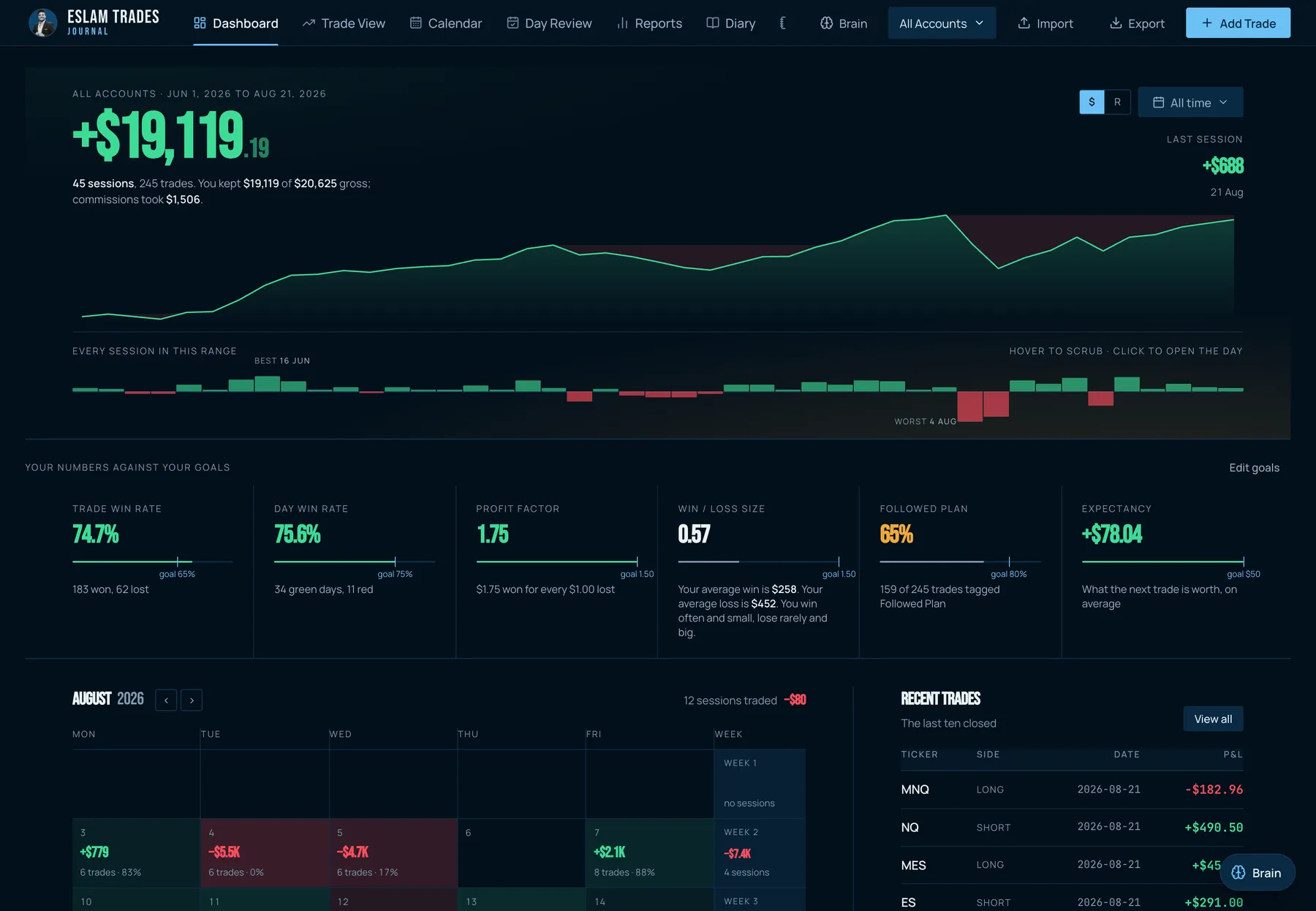
Screens shown with sample data.
Built for futures traders
- NQ, ES and the microsPoint values built in. Enter entry, stop, target and partial exits; P&L, risk and R are calculated for you.
- Everything in RSwitch the whole dashboard from dollars to R. Win, loss and break-even are tracked separately.
- Screenshots on every tradePaste with Cmd/Ctrl+V or drop images in. Scroll through them full screen.
- Notes that write themselvesA ready template for every trade: why you entered, what was missing, how you felt.
Find your edge and your leaks
- Time of day, every 15 minutesLondon, the New York open, the afternoon: see exactly when you make and lose money.
- Mistakes, emotions, setupsTag a trade with one click. See what "Moved Stop" or "Revenge Trade" really cost you.
- Weekly and monthly reviewsGuided questions, the stats for the period, and your trades linked in.
- Ready for AIExport any period with every detail and ask ChatGPT or Claude for a coaching review.
Eslam Trades Journal
- Mac & Windows app, works on 2 computers
- Your data stays on your computer
- Free updates inside the app
- VIP on Discord for 30 days
- USDT
- InstaPay
Try the journal free for 14 days
The full app on 1 computer, no card needed. We email you a trial key and the download links. Your 14 days start when you first open the app, and if you buy afterwards your trades stay right where they are.
Questions
How does the free trial work?
Enter your name and email and you get a trial key for 14 days, with the download links. Use the full journal and try every feature, no card needed. Your 14 days start when you first open the app. Start your free trial.
What happens when the trial ends?
The app stops, but your trades and notes stay saved on your computer. Buy the journal, enter your license key and carry on right where you left off.
The app shows a security warning the first time I open it
That's normal: the app isn't signed by Apple or Microsoft yet, so they ask once. It only happens the first time.
Mac: drag the app to Applications and open it. When macOS says it can't verify the developer, click Done. Open System Settings → Privacy & Security, scroll down to the line about Eslam Trades Journal and click Open Anyway, then confirm with your Mac password.
Windows: run the Setup. If a blue "Windows protected your PC" screen appears, click More info → Run anyway.
How do I pay?
With USDT (TRC20) or InstaPay in Egyptian pounds. Send the payment, attach a screenshot of the transfer at checkout, and you're done.
When do I get my license key?
By email, as soon as your payment is confirmed (usually within a few hours).
Does it work with prop firm and funded accounts?
Yes. It's built for futures (NQ, ES and the micros) and also handles forex symbols. Track each account on its own: evals, funded accounts or your personal account.
Does it work on Mac and Windows?
Yes. You get both downloads. Mac needs an Apple Silicon Mac (M1 or newer) on macOS 12+; Windows needs Windows 10 or 11.
Where is my data stored?
Only on your computer. Nothing about your trades is uploaded anywhere.
Do I need internet?
Only to activate the app and to get updates. After that the journal works offline.
On how many computers can I use it?
Two computers with one license.
How do I move my journal to a new computer?
In Settings → Backups, download a full backup of your journal, then restore that file in the app on your new computer. All your trades, notes and screenshots come with it.
Are updates included?
Yes. Updates are free and install right inside the app.
Is the AI included?
The journal, stats and exports work fully without AI. The built-in AI coach uses your own Anthropic API key, which you pay for per use. Or export your journal and upload it to any AI chat you already use.
Can I import trades from my broker?
You log trades in the app (it takes seconds) and there is a CSV import for Thinkorswim, Interactive Brokers and a generic template. Tradesea / Rithmic import is coming.
Do I get VIP on Discord?
Yes. Your confirmation email has a link to connect your Discord: you get the VIP role for 30 days, and this purchase counts as 2 purchases toward your tier (Bronze, Silver, Gold…).
Is it a subscription?
No. You pay once and keep the version you bought.
Can I get a refund?
No. It's a one-time digital purchase, so once your licence key is sent the sale is final. Not sure yet? Start the free trial first and see if it fits your trading. See the refund policy.
Not ready to buy yet?
Join the free Discord community first, or get the journal together with my book and save.